How to Make Your Hotel Cameras Pay for Themselves: 22 AI CCTV Use Cases
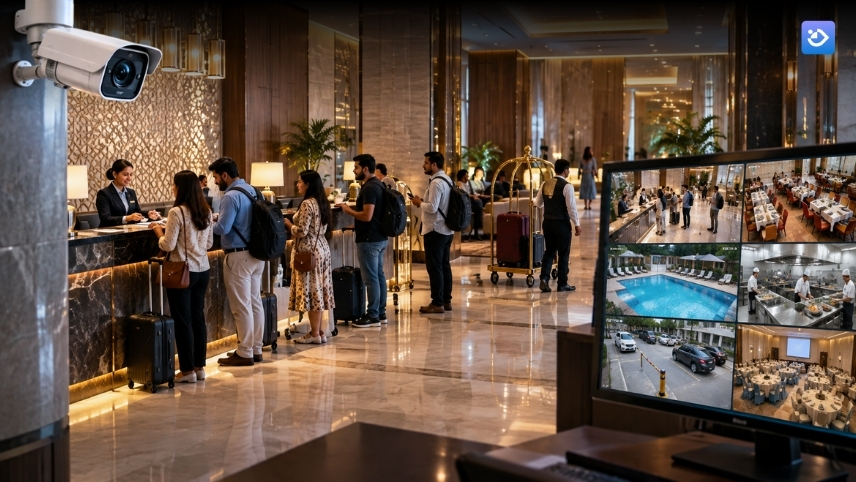
It is 11:40 on a Saturday night. Nineteen guests stand in your lobby with luggage, one agent works the desk, and the banquet next door has overrun by forty minutes. On the third floor, the AC is cooling an empty meeting room. In the kitchen, a cook is plating without a hairnet. All of it is on camera. None of it triggered anything.
Here is the question hotel owners rarely ask about the CCTV cameras they already run:
What do they earn?
You paid to install them, you pay to power, store, and maintain them, and you pull the footage when a complaint, a theft, or an inspection forces the issue. A camera used only to explain a loss after it has been booked is a cost line with exactly one use.
Below are 22 use cases of AI video analytics for hotels, and each one comes with a plain benefit: revenue you capture, money you stop losing, a penalty you avoid, or a liability you reduce. Each one runs on the compatible cameras you already have, so you are adding intelligence to your current setup and not replacing it.
Why Hotel Cameras Cost Money and Return Nothing
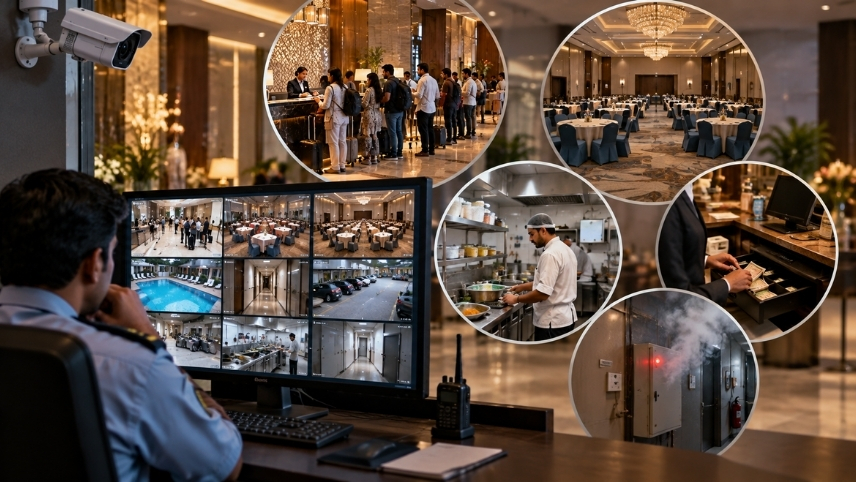
Demand is not the problem. The Ministry of Tourism's India Tourism Data Compendium 2026, as summarised by The Policy Edge, records 428.55 crore domestic tourist visits in 2025. These are visits and not unique travellers, so read the number as a sign of demand and not a headcount. More footfall means longer queues, more tables to turn, and more places for money to slip out, while your camera network stays as passive as the day it was installed.
Passive cameras turn ordinary hotel problems into stories you tell afterwards:
- A queue builds at check-in and surfaces as a one-star review two days later.
- A banquet hall sits lit and cooled all afternoon, and the cost appears only in the monthly electricity bill.
- A cash mismatch is found at day end, when the only way to investigate is to scrub six hours of footage.
- A fire starts in a store room, and the first alert is a guest calling reception.
Each of these costs less to fix while it is still happening, and a good deal more once it has become a refund, a review, or a repair. That timing is the whole difference between CCTV and AI video analytics, and the use cases below are built around it.
7 Hotel Video Analytics Use Cases That Fill Tables, Halls and Lobbies
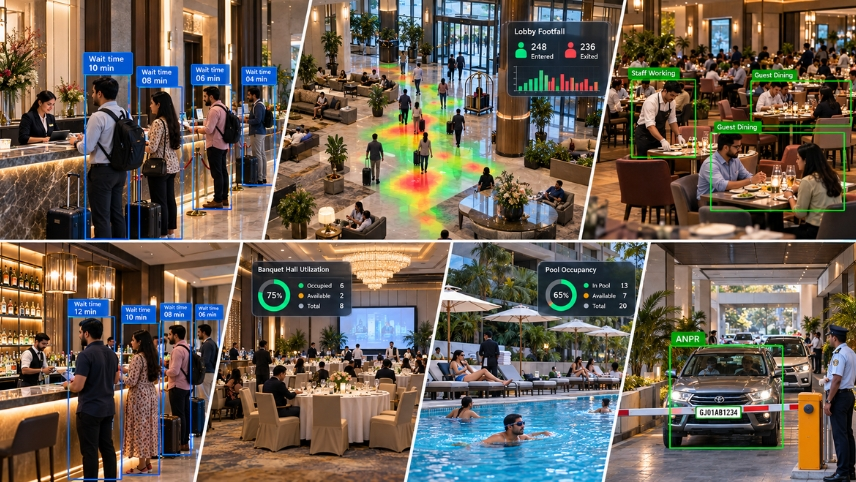
Revenue leaks in hotels are rarely dramatic. A guest gives up on the queue. A table is cleared eight minutes late. A meeting room goes unused for weeks, and nobody can say how many. Each loss is small, and the total across a property is a number your finance head would recognise. These seven use cases put a count and a clock on all of them.
- Check-in and front desk queue alerts: When the line at reception crosses the limit you set, the duty manager gets an alert while the wait is still short. Open the second counter, and the guest who would have stood there fuming checks in quickly and starts the stay in a good mood. That protects your review score on the very night a tired traveller is most likely to write one.
- Lobby and common-area footfall and dwell heatmaps: These heatmaps show where guests actually walk and where they stop. Put the coffee counter, the promotion stand, or the second concierge where people already gather, and you earn from traffic you were getting anyway. Your roster can follow the real crowd too, so you stop paying people to stand in quiet corners.
- Restaurant table occupancy and turnover tracking: Shows how long each table stays occupied and how long it sits empty before the next party. Dining-area occupancy is a core module in AI video analytics for hotels. When tables sit idle during a Sunday rush, you can see it and fix it, which means more revenue from the same number of seats.
- Restaurant and bar walk-away detection: Four guests wait at the bar entrance; nobody acknowledges them, and they leave. That sale never reaches the POS, so no report ever shows it. Restaurant and bar walk-away detection counts the guests who arrive and leave unserved, so you can see which hour loses them and put a host or an extra server there. A leak you could never see becomes a number you can chase.
- Meeting room and banquet hall utilization data: Hall rates are often quoted on instinct. Meeting room and banquet hall utilization data shows how many hours each space is really in use. You can price the empty slots, build a package around them, and decide whether that second conference room needs a refurbishment or a different use before you spend money on the wrong space.
- Pool, gym and spa occupancy: Counts how many people are in each space right now. Reception can give a guest an honest answer about crowding, and you can manage access at busy hours so the amenity feels premium and not packed. Over time, the history shows whether an amenity you advertise is used enough to justify what it costs to run.
- Parking occupancy and ANPR entry logs: Tell you how full the lot is without sending a guard to walk it. A timestamped record of every number plate settles arguments over valet charges, overstays, and unauthorised parking in minutes, and your guard gets back to work that actually needs a person.
Seven signals, and every one of them already exists in your hotel, uncollected. Collecting them takes cameras that report what they see, not a new guest-facing system. Start with the low-hanging fruit. For most properties that is the queue at reception or the table turn at the restaurant because both convert to rooms and covers within a month.
Do you know how many guests left your lobby or restaurant last month because nobody saw them waiting?
Try Mikshi AI for FREEStaff, Cost and Cash: 4 Use Cases That Close the Quiet Leaks
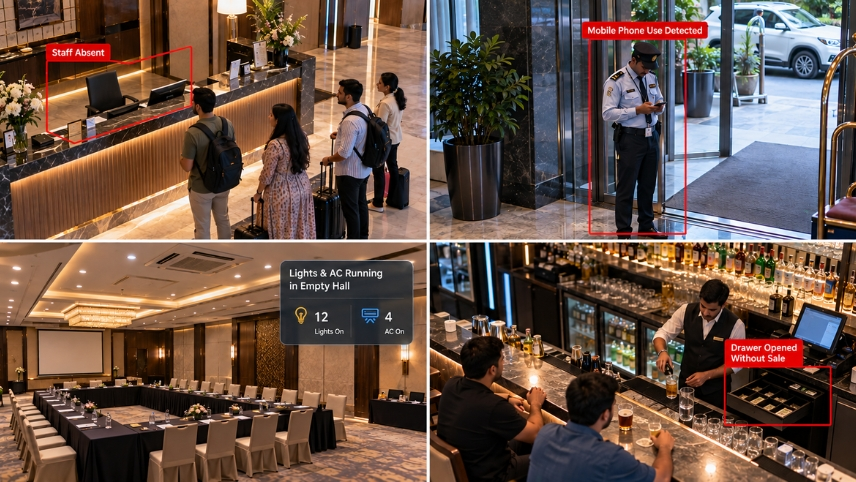
The quiet leaks in a hotel are the ones no single person owns. Nobody is accountable for the empty hall that stays cooled, the drink poured without a bill, or the gate post that is covered on the roster and empty in reality. These four use cases give each leak an owner and a same-day signal.
- Staff on-post presence and attendance: Confirms that the gate, the lobby and the service corridor are covered when the roster says they are. A camera record is much harder to argue with than a register signed at the start of a shift. You stop paying for a post that stands empty, and you know where a gap could let trouble in.
- Mobile phone use on duty alerts: A guard scrolling through a phone at the entrance is a gap with a salary attached. Mobile phone use on duty alerts at fixed posts, such as the front desk, the gate and the cash counter, let a supervisor have a quiet word on the spot. Attention comes back to the posts that matter, and nobody has to stand over every shift to get it.
- Detecting lights and AC running in empty spaces: Energy accounts for 3% to 5% of a hotel's total operating expense, according to a hotel energy guidebook prepared with guidance from India's Bureau of Energy Efficiency. That share is small enough that nobody audits the empty banquet hall, and large enough that it never stops costing you. Detecting lights and AC running in empty halls, meeting rooms, and back offices tells your engineering team which zones are being lit and cooled for nobody. Switch them off, and the savings shows up on a bill you pay every month.
- Cash counter and bar activity matched against POS records: Flags a drawer opened without a sale or a drink served without a bill. The manager sees the time and the camera angle straight away, and not three weeks later in a stock report. A quiet line in your P&L gets a witness, and your honest staff get protection from blanket suspicion.
A monthly audit finds a gap after its cause has gone. A daily signal finds it while someone can still act.
What if the empty hall, the unrung drink and the unmanned desk showed up on your phone the same day, from the cameras you already run?
Try Mikshi AI for FREEHygiene and Compliance: 4 Use Cases That Keep Surprise Inspections Boring
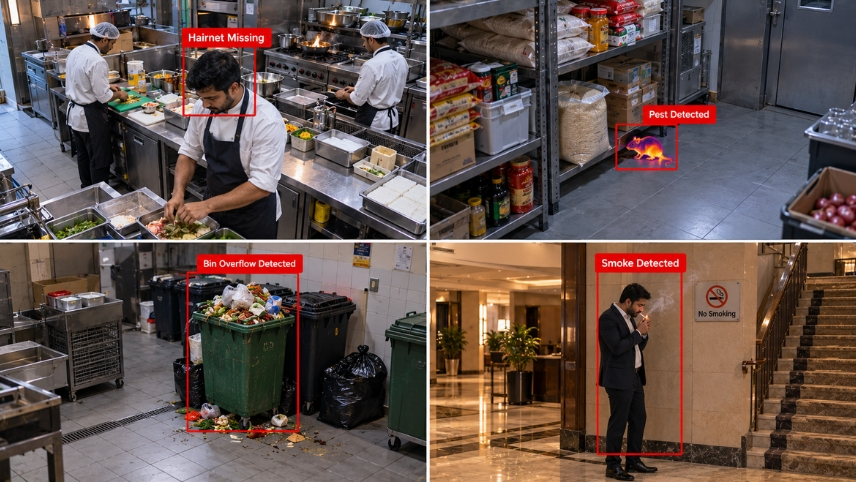
Your kitchen answers to the same food safety enforcement as any restaurant in the city, and an inspector does not wait for your hygiene supervisor's round. Ask any inspector: the visit that hurts is the unannounced one. A hotel with several outlets multiplies that exposure, because every kitchen, bakery and room-service pantry is a separate place to fail. Cameras already cover most of these spaces, so the real question is whether anyone checks what they see, and whether the proof exists on the day someone asks for it.
- Kitchen PPE checks: Hairnets, gloves and masks get skipped at the dinner rush, when nobody from quality is watching. Kitchen PPE checks flag the missing item at the pass, so a supervisor can fix it on the spot, and the dated record is there when an auditor asks. The camera-based approach is covered in more depth in this guide to restaurant food safety compliance.
- Pest sightings in kitchens and stores: A rodent crossing a dry store at 3 AM leaves no report, only a complaint later. Pest sightings in kitchens and stores can be flagged from after-hours footage, so the first report of a pest comes from a camera and not from a guest or an inspector. You call pest control early, protect your stock, and avoid an awkward line in an inspection note.
- Garbage bin overflow alerts: An overflowing bin behind the restaurant is a smell, a pest magnet, and an inspection note. Garbage bin overflow alerts send housekeeping before a guest or an inspector notices, so a ten-minute job gets done before it turns into a complaint.
- Detecting smoking in non-smoking zones: A guest lighting up in a stairwell or banquet foyer is a fire risk and a complaint waiting to happen. Detecting smoking in non-smoking zones gives staff a location and a time to act on. Someone can walk over and politely ask the guest to stop instead of tracing a smell an hour later, and your other guests keep the clean air they paid for.
Hygiene is a compliance cost until a camera starts producing the proof for you. Dated clips of clean practice are cheaper to produce than an explanation after a failed audit.
Safety and Liability: 3 Use Cases That Shorten the Time to Respond
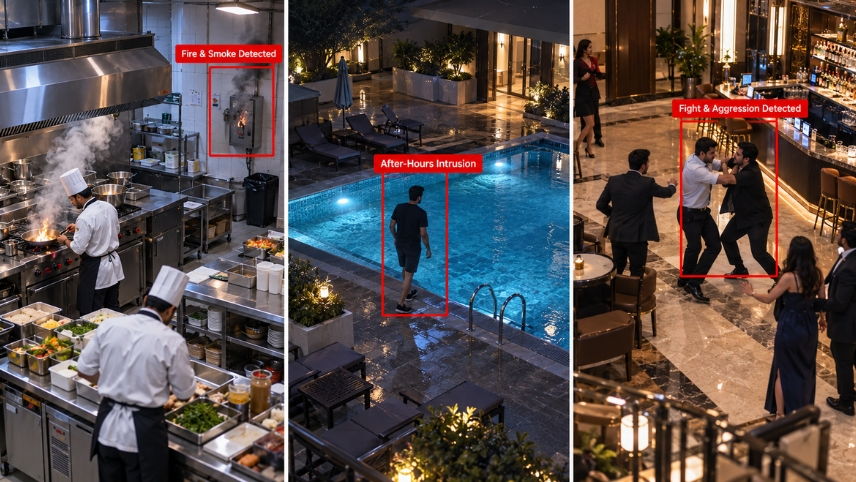
When a guest is hurt at a hotel, the first question is how long it took anyone to know. Response time is the one variable you control. India recorded 277 fire accidents in commercial buildings in 2024, and 249 people died in them. Hotels run around the clock with sleeping occupants, which is exactly when a late alert costs the most. Night shifts run thin, with one security guard and one duty manager covering the whole property, and a store room or service corridor can go unchecked for hours. In that window, the first person to learn about a problem is whoever happens to walk past it. Guests also judge a hotel by what happens in the first few minutes of a bad moment, and a calm, fast response is what they remember afterwards.
- Fire and smoke detection from cameras: Cameras covering kitchens, stores and service corridors flag visible flame or smoke while it is still small, so your team gets a head start before a small fire becomes a big one. The approach is covered in this piece on fire and smoke detection for manufacturing plants. It supports your alarm and sprinkler systems and does not replace them.
- After-hours pool access alerts: A pool open at 2 AM with nobody on duty is a drowning risk and a liability. After-hours pool access alerts tell security to clear the deck, so you deal with the risk before it becomes an accident and you can show that you acted. The camera detects people entering outside operating hours, and it does not replace a lifeguard.
- Fights and aggression detection: A scuffle at the bar entrance or in the lobby after a wedding reception escalates quickly. Fights and aggression detection gives the security team a location and a clip within moments, so they arrive before a raised voice turns into an injury. The same clip settles the story if it is disputed later, which protects you from an argument over who did what.
Three alerts, each worth more the sooner it arrives. None of them needs a person watching a wall of screens.
Would you rather learn about a smoking store room from an alert or from a guest at the front desk?
Try Mikshi AI for FREESecurity: 4 Use Cases for Gates, Back Doors and Blind Spots
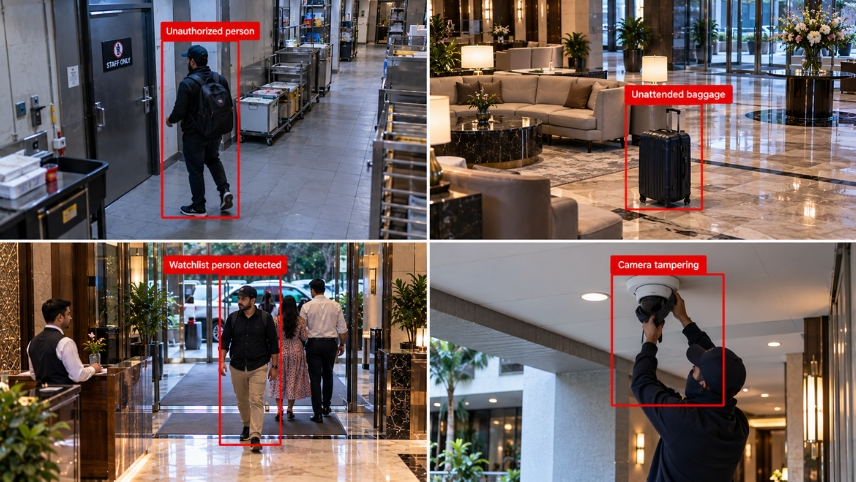
Security is the use case owners already associate with cameras, and the economics shift here too. A guard force watching sixty screens catches what it happens to see, and attention drops hardest at shift change. AI surveillance for hotels works as a second pair of eyes that never rotates out, with your guards free to respond rather than stare. None of this removes the need for guards. A trained guard walking to the right corridor at the right moment is worth more than one watching a monitor wall, and that is the shift these four use cases make possible.
- Perimeter intrusion and restricted zones: Rooftops, plant rooms, and staff-only corridors run on zone and schedule rules, so entry at the wrong hour raises an alert. Someone on the roof at 3 AM or inside a plant room does not stay unnoticed, and your team is told while there is still time to walk over. This is the job an AI security guard does on every feed at once, not only the one a guard happens to be looking at.
- Unattended baggage detection: A bag left beside the lobby lounge or the porch is either a forgotten suitcase or a problem, and staff cannot tell which from a screen. Unattended baggage detection flags an item that has not moved for the time you set, so someone walks over and checks. You either return a forgotten bag to a relieved guest or deal with a real problem early, and your guards stop judging every suitcase on sight.
- Watchlist person recognition: Alerts your security team when someone your property has a documented reason to flag, such as a banned guest or a known offender, enters the premises. The team can step in at the door and not after an incident inside, which keeps your other guests safe and keeps your staff out of confrontations they did not need. Treat it as a narrow watchlist with clear signage, a retention policy and legal review, and read this guide to DPDP compliance in hospitals for how privacy obligations are approached before you switch it on.
- Camera tampering alerts: Tell you when a lens is covered, turned, or blinded, which is often the first step before something else goes wrong. You find out when it happens, and not on the day you need the footage and discover there is none. A camera that goes blind unnoticed leaves every other use case on this list switched off.
Put together, these four turn the guard room from a place where footage is watched into a place where alerts are answered.
How Mikshi AI Closes the Gap Between Footage and Revenue
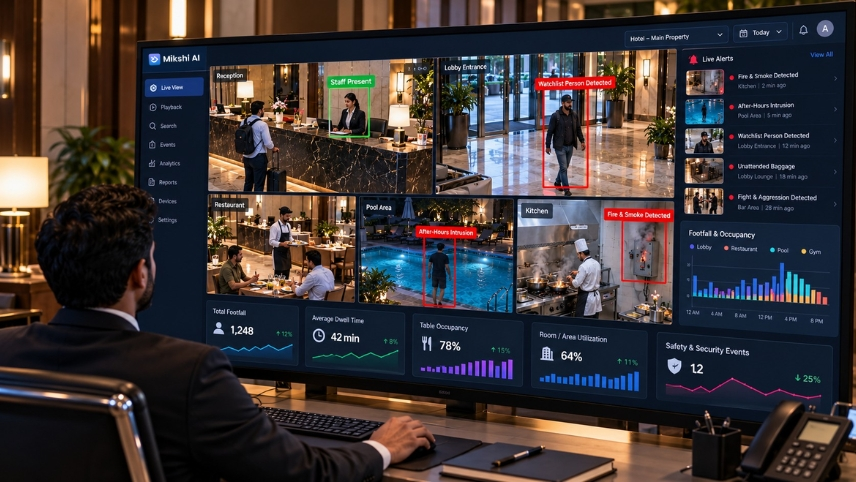
Go back to that Saturday night: the queue at reception, the cooled empty hall, the cook without a hairnet. Your cameras saw all of it, and nothing reached you. Mikshi AI exists to close that gap. We connect to the compatible IP cameras you already run, read the feeds with AI models, and turn the events into alerts, dashboards, and reports your teams can act on the same day. Your CCTV is not obsolete; it is waiting for a brain, and that brain pays for itself through the use cases above.
- Built on your existing cameras: Compatible IP cameras connect through RTSP streams, and a compatibility review checks stream availability, camera position and image quality before rollout, with no new cameras needed where yours qualify.
- Flexible deployment with guest privacy: Processing can sit on your premises, in the cloud, or in a hybrid setup, and guest rooms, bathrooms, and changing spaces are excluded by design.
- One view across properties: Hotel groups bring events from every property into a central dashboard, so regional teams can see recurring issues and prioritize follow-up.
- Phased, high-ROI rollout: Start with the two or three use cases that touch your biggest number, such as front desk queues or cash counter mismatches, and add outlets as results come in.
- Actionable, integrated workflows: Detected events appear in dashboards, alerts, and reports, and available integrations can connect them to alarms, access control, and other workflows. Every alert is tied to a camera, a location, and a time, so the person who receives it knows exactly where to walk.
To see which of these 22 use cases fits your property, start with the AI video analytics for hotels page and pick the three that touch your costliest leak.
Every night, your cameras stay passive; your hotel's data depends on what a tired night manager happened to notice.
Try Mikshi AI for FREEIn this article
- Why Hotel Cameras Cost Money and Return Nothing
- 7 Hotel Video Analytics Use Cases That Fill Tables, Halls and Lobbies
- Staff, Cost and Cash: 4 Use Cases That Close the Quiet Leaks
- Hygiene and Compliance: 4 Use Cases That Keep Surprise Inspections Boring
- Safety and Liability: 3 Use Cases That Shorten the Time to Respond
- Security: 4 Use Cases for Gates, Back Doors and Blind Spots
- How Mikshi AI Closes the Gap Between Footage and Revenue


